By clicking "Allow All", you agree to the storing of cookies on your device to enhance site navigation, analyze site usage, and assist in our marketing efforts. Privacy Policy
Cookie Settings
Privacy Preference Center
When you visit any website, it may store or retrieve information on your browser, mostly in the form of cookies. This information might be about you, your preferences or your device and is mostly used to make the site work as you expect it to. The information does not usually directly identify you, but it can give you a more personalized web experience. Because we respect your right to privacy, you can choose not to allow some types of cookies. However, blocking some types of cookies may impact your experience of the site and the services we are able to offer.
Necessary
Necessary cookies help make a website usable by enabling basic functions like page navigation and access to secure areas of the website. The website cannot function properly without these cookies.
Analytics
Analytics cookies help website owners to understand how visitors interact with websites by collecting and reporting information anonymously.
Marketing
Marketing cookies are used to track visitors across websites. The intention is to display ads that are relevant and engaging for the individual user and thereby more valuable for publishers and third party advertisers.
Instructions for Creating a QR Code in the Partner Portal
Why use a QR code?
A QR code makes it easy for your clients to learn more about Global Rescue services and/or purchase a membership by simply holding their smart phone camera over the QR code. They will instantly be sent to the page of your choice: your Global Rescue co-branded landing page, your Global Rescue membership enrollment page or the Global Rescue home page. QR codes can be used in print advertisements, brochures, posters, postcards, signs, business cards and more.
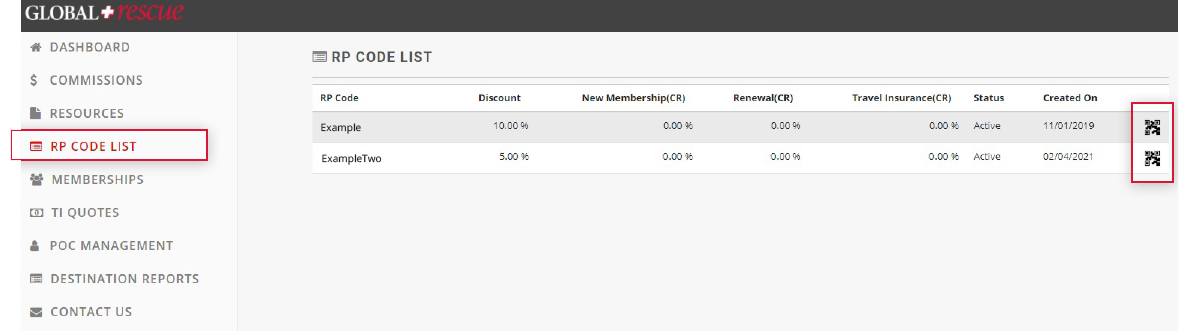
3. Identify which RP code you want to generate a QR code for (if you have more than one)
4. Click the QR code icon to the right of the “Created On” column
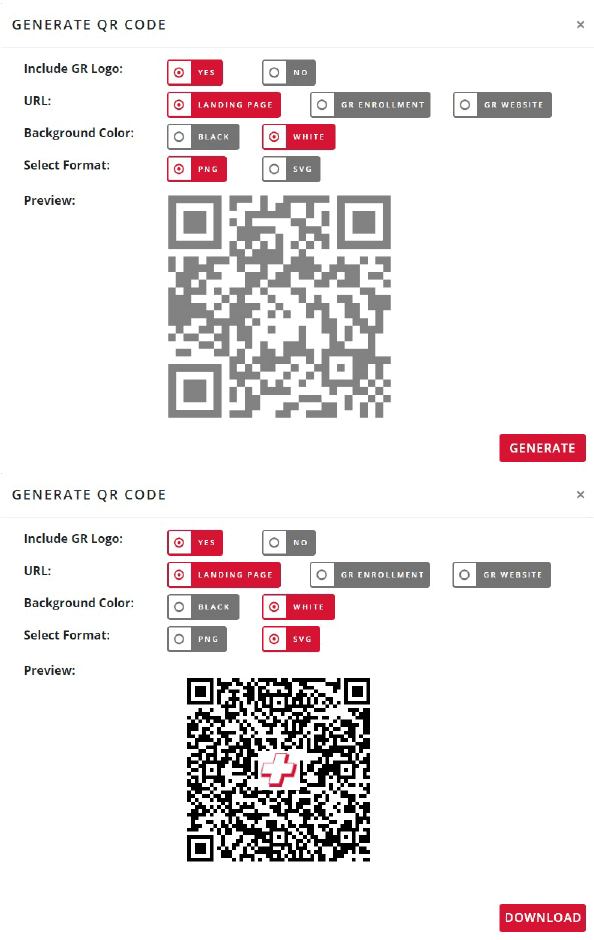
5. A “GENERATE QR CODE” box pops up where you can select QR code features
6. Click on the features you want for your QR code
7. Note: “URL” feature allows you to associate the QR code with your co-branded landing page, your Global Rescue membership enrollment
page or the Global Rescue home page. In all cases your RP code will be tracked for commissions purposes
8. Select “GENERATE”
9. Select the “DOWNLOAD” button
10. Add your new QR code to your marketing collateral and your RP code is tracked automatically.
This site uses cookies. By continuing to use our site, you are agreeing to our Privacy Policy
Download the complete Risk Assessment
join our mailing list
GET ACCESS TO GRID
DOWNLOAD THE REPORT
DOWNLOAD THE REPORT
VIDEO
Loading...
FREE DESTINATION REPORT
have you signed up for our global rescue newsletter?
LEGAL NOTICE
Mobile Apps:
Global Rescue Mobile Apps are designed for operation on the current versions of Android and iOS operating systems. Availability of services is subject to your equipment compatibility, connectivity and signal in your location. There is no guarantee that all features and functionality will be available in your location. Use and availability of the Mobile Apps are subject to your service provider’s plan and may be subject to additional fees from your provider. The download and use of a Global Rescue Mobile App is subject to the terms of your Member Services Agreement and the applicable End User License Agreement (EULA).
For individuals 85+, medical transport is not included in membership. Members 85+ may purchase medical transport on a fee for service basis.
Mobile Apps:
Global Rescue Mobile Apps are designed for operation on the current versions of Android and iOS operating systems. Availability of services is subject to your equipment compatibility, connectivity and signal in your location. There is no guarantee that all features and functionality will be available in your location. Use and availability of the Mobile Apps are subject to your service provider’s plan and may be subject to additional fees from your provider. The download and use of a Global Rescue Mobile App is subject to the terms of your Member Services Agreement and the applicable End User License Agreement (EULA).